NASDAQ Master Scanner

Search the NASDAQ for the setup you actually want.

There are thousands of NASDAQ stocks, but only a subset may match the technical structure you are investigating. Search the current scanner workspace for longer bases, higher lows, intact resistance, compression, supported chart patterns, PBI, OBV, RVOL, moving-average relationships and participation context.
✓ 3,200+ NASDAQ stocks ✓ Simple + advanced filters ✓ Pattern search ✓ Research tools — not trade signals
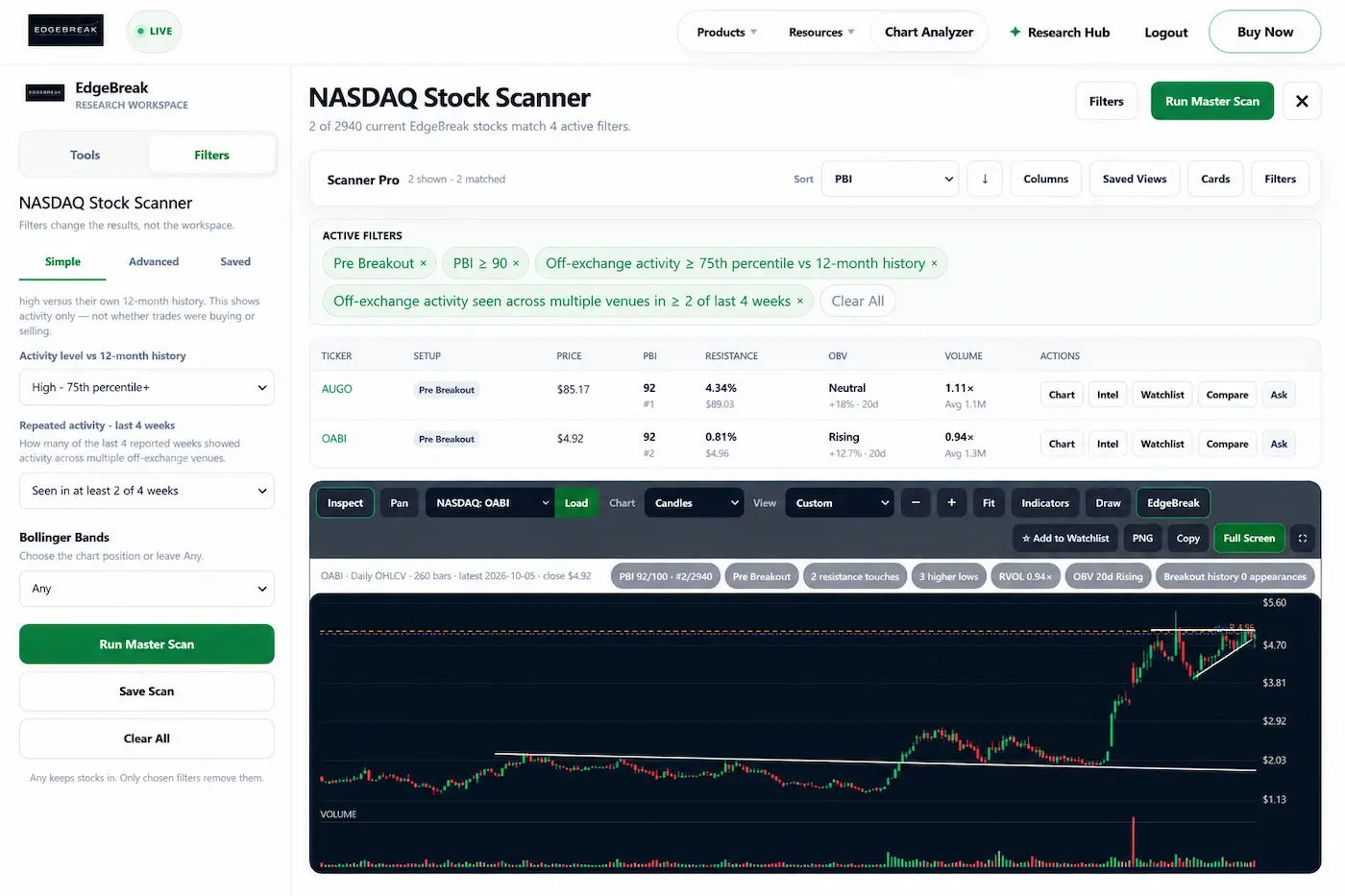
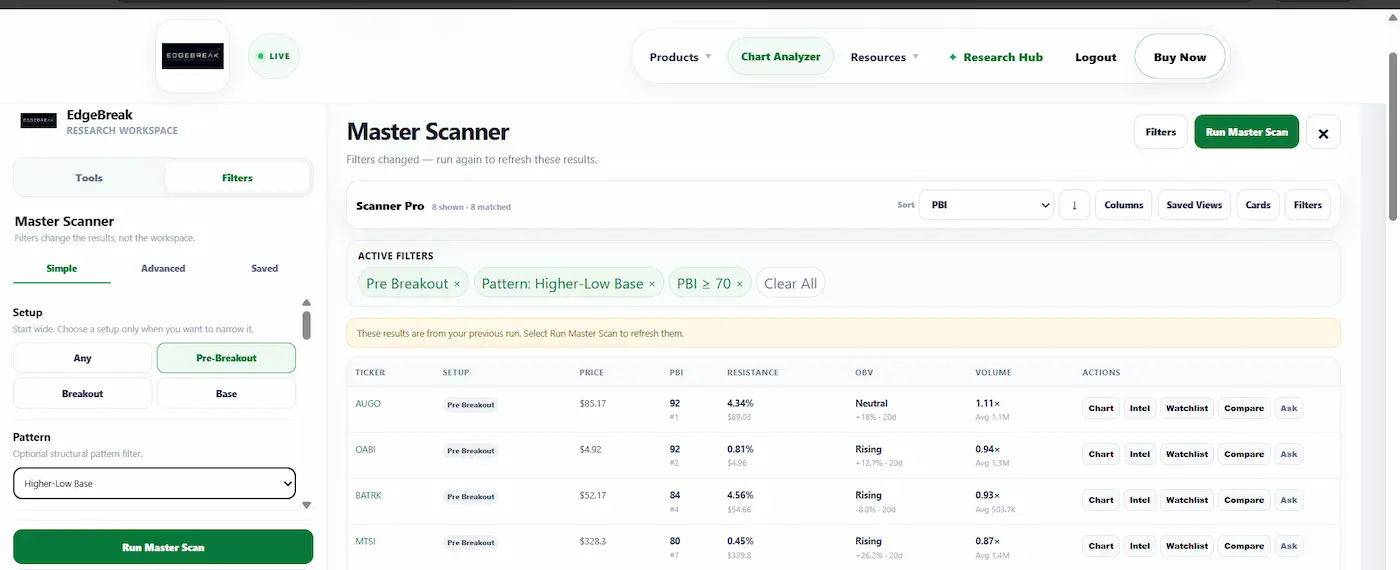
EdgeBreak Master NASDAQ Stock Scanner showing setup, PBI, OBV, pattern, resistance and volume filters
3,200+NASDAQ-listed stocks in the current scanner universe
OneNASDAQ stock scanner for broad technical discovery
Simplefilters for fast everyday scanning
Advancedfilters when you want to define a tighter setup
Example research workflow

Turn a chart idea into an executable scanner search.

For example: Find NASDAQ Pre-Breakout stocks with PBI ≥ 90, off-exchange activity at or above the 75th percentile of their 12-month history, and off-exchange activity across multiple venues in at least 2 of the last 4 reported weeks.

One scanner, more control

Build the setup you want to research.

The NASDAQ Stock Scanner brings EdgeBreak's core discovery filters together so you can start broad, combine conditions and refine the NASDAQ universe without jumping between multiple scanner pages.

01 · SETUP

Choose the stage

Start with any current stock, or narrow by Breakout, Pre-Breakout, base and supported scanner combinations.

02 · PATTERN

Search structure

Filter for supported patterns such as ascending triangles, tight bases, resistance compression, higher-low bases, bull flags and support bounces.

03 · EVIDENCE

Add technical context

Combine PBI, OBV, RSI, volume, resistance behaviour, moving averages and other technical conditions to tighten the result set.

NASDAQ Stock Scanner filters

Go from broad discovery to a precise research list.

Every filter starts open. Add only the conditions that matter to the setup you are researching and rerun the scanner as you refine the idea.

Breakout stage Chart pattern PBI OBV RSI Relative volume Resistance distance Resistance tests Higher lows Moving-average crosses Trend MACD Bollinger Bands Off-exchange activity
A stock matching your filters is a research candidate, not a prediction. EdgeBreak keeps discovery separate from the decision you make after reviewing the chart, company and wider market context.
Setup + patternDefine where the stock is in its structure and what kind of chart setup you want to investigate.
PBI + OBVUse pressure-building and volume-flow context to refine the technical picture.
Resistance + higher lowsFilter by proximity to resistance, repeated tests and improving support structure.
Volume + indicatorsAdd relative volume, RSI, trend, MACD, Bollinger Bands and moving-average conditions.
Off-exchange contextFor members, add unusual reported off-exchange volume and repeated multi-venue activity as research context.
Saved scansSave useful filter combinations so recurring research setups are faster to run again.
Built into one scanner

Breakout, Pre-Breakout and Base filters in one workspace.

Choose the setup mode you want inside the NASDAQ Stock Scanner, then combine it with pattern, PBI, OBV, resistance, volume and other supported filters.

BreakoutNASDAQ Stock Scanner setup filter for stocks already moving through established resistance.Built into NASDAQ Stock Scanner
Pre-BreakoutNASDAQ Stock Scanner setup filter for developing structures approaching resistance before confirmation.Built into NASDAQ Stock Scanner
Base / Launch PadNASDAQ Stock Scanner setup filter for organised bases and established trading ranges.Built into NASDAQ Stock Scanner
Connected research workflow

Find the stock, then keep investigating.

Scanner results connect into the wider EdgeBreak workflow instead of ending as a ticker list.

01 · SCANNarrow the NASDAQRun your selected filters against the current EdgeBreak scanner universe.
02 · CHARTInspect structureOpen the EdgeBreak chart and review resistance, higher lows, volume and recent price behaviour.
03 · RESEARCHCheck the companyContinue into company information, financial highlights, news, filings and institutional context.
04 · ORGANISEUse My WorkspaceAdd candidates to your watchlist and keep your ongoing research in one place.
NASDAQ Stock Scanner vs daily scan

Automated shortlist or your own scan.

EdgeBreak gives you both. The Automated Daily Scan provides a ready-made starting point after the market close. The NASDAQ Stock Scanner is for the times you want to define the criteria yourself.

AUTOMATED

Daily NASDAQ Scan

EdgeBreak performs the first pass and presents a focused daily shortlist without requiring you to build filters.

CUSTOM

NASDAQ Stock Scanner

You decide the setup, pattern and technical conditions, then run the search against the current scanner universe.

SETUPS

Built-in setup filters

Breakout, Pre-Breakout and Base / Launch Pad are available as focused setup filters inside the NASDAQ Stock Scanner.

Common questions

NASDAQ Stock Scanner FAQ.

What is the EdgeBreak NASDAQ Stock Scanner?

It is EdgeBreak's broad manual scanner. It combines setup, pattern, PBI, OBV, volume, resistance, moving averages, technical indicators and selected market-activity filters in one workspace.

Where are Breakout, Pre-Breakout and Launch Pad now?

They are setup filters inside the NASDAQ Stock Scanner. Select Breakout, Pre-Breakout or Base / Launch Pad, then add the other technical filters you want.

How many NASDAQ stocks does it search?

The current EdgeBreak scanner universe contains more than 3,200 NASDAQ-listed stocks, subject to data availability and EdgeBreak's universe rules.

Can I search for chart patterns?

Yes. Supported NASDAQ Stock Scanner patterns include ascending triangles, tight bases, resistance compression, higher-low bases, bull flags and support bounces.

Does a scanner match mean I should buy the stock?

No. Scanner matches are research candidates. EdgeBreak does not provide buy, sell or hold recommendations, and a technical setup does not guarantee future performance.

Build your own NASDAQ scan

One scanner. The setup you want to research.

Start with EdgeBreak Standard for the full web scanner platform, or choose Full Access when you also want EdgeBreak inside ChatGPT.

Standard $35 • Full Access $50
USD per month • Cancel anytime • Research and educational information only